
Picture this: it’s Monday morning, your coffee is going cold, and you’re manually copying and pasting the same post across four different social media platforms. Again. You’re a business owner or marketing manager, not a copy-paste machine, yet somehow social media admin has swallowed another hour of your day. The good news is that social media automation has matured to the point where small businesses can now schedule weeks of content in a single sitting, maintain a consistent brand voice, and still have time left over for the work that actually grows revenue.
Table of Contents
- Why automate your social posting?
- What you need to get started
- Step-by-step: How to automate social posting
- Common pitfalls and troubleshooting tips
- Measuring the impact: What to expect from automation
- The truth about automating social posting
- Streamline your social posting with EasiSocial
- Frequently asked questions
Key Takeaways
| Point | Details |
|---|---|
| Save time and increase consistency | Automating social posting dramatically reduces manual effort while improving publishing regularity. |
| Use the right tools | Selecting an all-in-one automation platform streamlines your workflow and helps avoid common errors. |
| Keep engagement human | Automation should work alongside, not replace, genuine interactions with your audience. |
| Measure and refine | Regularly track results and update your strategy to ensure ongoing improvement. |
Why automate your social posting?
Manual posting is one of those tasks that feels manageable until it suddenly isn’t. You miss a peak engagement window because you were in a client meeting. You forget to post on a bank holiday weekend. You spend twenty minutes finding the right image when you should be closing a sale. These small interruptions add up to a significant drain on your working week.
Automation solves this by separating the creation of content from the delivery of it. You batch your creative work when you’re in the right headspace, schedule everything in advance, and let the platform handle the rest. The result is a consistent posting rhythm that your audience can rely on, which directly improves trust and brand visibility.

The wider benefits go beyond saving time. Consistent posting signals to platform algorithms that your account is active, which typically improves organic reach. You also gain access to consolidated analytics, so you can see which content resonates and plan future posts accordingly. As scheduling and automating social posts increases efficiency for media organisations, the same principle applies to any small business managing multiple channels.
Here is a quick summary of the core benefits:
- Consistency: Posts go out at optimal times, every time, regardless of your schedule.
- Time savings: Batch scheduling frees up hours each week for higher-value tasks.
- Better analytics: Centralised dashboards reveal what is working across all platforms.
- Scalability: As your business grows, your posting volume can grow without adding headcount.
- Reduced human error: Fewer last-minute posts mean fewer typos and off-brand moments.
“The businesses that win on social media are not the ones posting the most. They are the ones posting consistently. Automation is the engine that makes consistency possible without burning out your team.”
What you need to get started
Before you touch a single scheduling tool, you need a few foundations in place. Rushing into automation without these is like building a house without a floor plan.
Essential prerequisites:
- Active accounts on the platforms your audience uses (Facebook, Instagram, LinkedIn, X/Twitter, or others)
- A library of brand-approved images, videos, and graphics
- A set of post templates that reflect your brand tone and style
- A content calendar, even a basic one in a spreadsheet, outlining themes and campaign dates
- Login credentials and admin access for all accounts you plan to connect
Once those are ready, you need to choose your management platform. This is where all-in-one management kit solutions earn their place. Rather than juggling separate tools for scheduling, analytics, and content storage, a single platform handles everything in one dashboard.
Here is a comparison of common features across automation tool categories:
| Feature | Basic scheduler | Mid-tier platform | All-in-one kit |
|---|---|---|---|
| Multi-platform posting | ✓ | ✓ | ✓ |
| Bulk upload / CSV import | ✗ | ✓ | ✓ |
| Analytics dashboard | Limited | ✓ | Advanced |
| Content calendar view | ✗ | ✓ | ✓ |
| Team collaboration | ✗ | Limited | ✓ |
| Post approval workflows | ✗ | ✗ | ✓ |
| Hashtag suggestions | ✗ | ✓ | ✓ |
As all-in-one social media management platforms streamline scheduling and automation, the jump from a basic scheduler to a full management kit becomes worthwhile very quickly, especially if you manage more than two platforms.
Pro Tip: Before committing to any tool, check that it natively integrates with every network you use. Some platforms charge extra for certain networks or limit the number of connected accounts on lower-tier plans. Always test the free trial with your actual accounts before purchasing.
Step-by-step: How to automate social posting
Now for the practical part. Follow these steps in order and you will have a working automation system running within a single afternoon.
-
Connect your social accounts. Log into your chosen management platform and authorise each social media account. You will typically need admin access. Grant the permissions the platform requests, as these are needed for posting on your behalf.
-
Audit your existing content. Before scheduling anything new, gather your best-performing posts from the past three months. These form the backbone of your initial content calendar and give you a proven starting point.
-
Build your content calendar. Map out four weeks of posts, including the platform, date, time, copy, image, and any relevant hashtags. A spreadsheet works fine at this stage. Most platforms accept bulk CSV uploads, which means you can schedule an entire month in one import.
-
Configure your posting schedule. Set your preferred posting times based on when your audience is most active. Most platforms provide recommended windows based on your account’s historical data. Start with two to three posts per week per platform and increase once you see consistent engagement.
-
Upload and review. Import your content calendar, preview each post exactly as it will appear on each platform, and check for formatting issues. Images that look fine on desktop sometimes crop oddly on mobile.
-
Activate and monitor. Switch your schedule live. Check in daily for the first week to catch any unexpected errors, then move to a weekly review rhythm once things are running smoothly.
Here is a direct comparison of manual versus automated workflows:
| Task | Manual workflow | Automated workflow |
|---|---|---|
| Writing and posting | Done in real time, often rushed | Batched in advance, reviewed calmly |
| Posting consistency | Depends on memory and availability | Guaranteed by schedule |
| Peak-time posting | Requires you to be online | Handled automatically |
| Analytics review | Ad hoc, platform by platform | Centralised, weekly |
| Content approval | Informal or skipped | Built into the workflow |
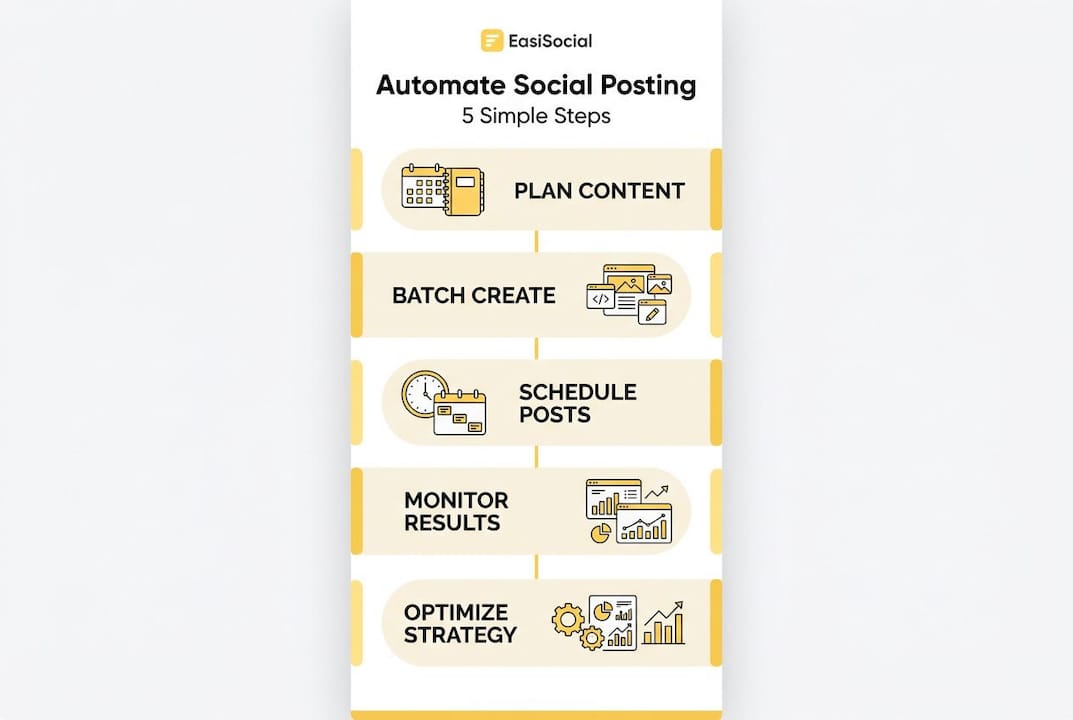
Scheduling posts in advance helps small businesses maintain an active presence even during holidays, busy periods, or staff absences. This is one of the most underrated advantages of automation.
Pro Tip: Use bulk upload to schedule a full month of content in one session. Pair this with a lifetime access to automation plan so you are never locked into monthly fees as your volume grows. You can also see the platform in action before committing, which removes the guesswork entirely.
Common pitfalls and troubleshooting tips
Even a well-built automation system can run into problems. Knowing what to watch for saves you from embarrassing posts and missed opportunities.
The most common mistakes small businesses make:
- Time zone mismatches: Your tool may default to a different time zone than your audience. Always double-check that your scheduling platform is set to the correct local time for your target market.
- Duplicate content: Importing the same CSV twice, or having overlapping campaigns, can result in the same post going out multiple times. Always review your scheduled queue before activating a new batch.
- Neglecting real engagement: Automation handles outbound posting, not inbound responses. If you stop checking comments and messages because “the automation is running,” your engagement rate will drop and your audience will feel ignored.
- Outdated content going live: Evergreen posts scheduled months in advance can become irrelevant or even tone-deaf if circumstances change. A post celebrating a product launch that has since been delayed is awkward at best.
- Platform API changes: Social networks occasionally update their APIs, which can temporarily break integrations. Keep your management platform updated and check for announcements from your provider.
Quick fixes for each issue:
- Adjust the time zone setting in your platform’s account preferences immediately after setup.
- Use your platform’s duplicate detection feature, or manually scan your queue before each new batch goes live.
- Block fifteen minutes each morning to respond to comments and messages across all platforms.
- Schedule a monthly content audit to review everything queued more than two weeks out.
- Subscribe to your automation tool’s update notifications so you hear about API issues before they affect your posts.
“Automation should not eliminate the need for engagement or monitoring.” Treating your social channels as a broadcast-only medium is the fastest way to lose the audience you worked hard to build.
As proactive automation advice consistently highlights, the businesses that get the most from automation are those that treat it as a support system, not a replacement for genuine human interaction.
Pro Tip: Set a recurring calendar reminder for the first Monday of each month to audit your scheduled content. Check for relevance, accuracy, and tone. This single habit prevents the majority of automation-related embarrassments.
Measuring the impact: What to expect from automation
Once your system is live and you have two to four weeks of data, it is time to measure what is actually working.
Key metrics to track:
- Follower growth rate: Are you gaining followers consistently? A steady upward trend suggests your content is attracting new audiences.
- Engagement rate: Likes, comments, shares, and saves divided by reach. This tells you whether your content is resonating, not just being seen.
- Click-through rate: For posts with links, how many people are actually visiting your website? This is the most direct indicator of commercial impact.
- Reach and impressions: Reach counts unique viewers; impressions count total views. Both should grow as your posting consistency improves.
- Best-performing post types: Are videos outperforming static images? Are questions generating more comments than statements? Use this data to refine your content mix.
What you can realistically expect:
Most small businesses see measurable improvements within the first six to eight weeks of consistent automated posting. The gains are not dramatic overnight, but they are compound. As automation leads to increased post frequency and better audience engagement over time, the cumulative effect on brand visibility is significant.
A useful benchmark: if your engagement rate stays flat or improves while your posting frequency increases, your automation system is working. If engagement drops as frequency rises, your content quality or relevance needs attention, not your scheduling setup.
Improved consistency also means more brand visibility. When your audience sees your name regularly in their feed, you become a familiar presence rather than an occasional interruption. That familiarity builds the kind of trust that eventually converts followers into customers.
The truth about automating social posting
Here is something most automation guides will not tell you: the businesses that fail with social media automation are not the ones who chose the wrong tool. They are the ones who treated automation as a finishing line rather than a starting point.
There is a widespread belief that once you have scheduled your posts, the work is done. It is not. Automation handles the mechanical side of social media. The strategic side still requires human judgement. Which topics are resonating this month? Has your industry had a news event that makes a scheduled post look out of touch? Is your audience shifting towards video? These questions cannot be answered by a scheduling algorithm.
The most successful small businesses we see using effective media automation follow a consistent pattern: they use automation to handle the repetitive, time-sensitive work of posting, and they use the time saved to focus on creative strategy, community building, and genuine engagement. The technology handles the when; the human handles the why.
There is also a subtler lesson here. Automation works best when your content strategy is already solid. If you are automating mediocre content, you will simply get mediocre results delivered more efficiently. The tool amplifies what you put into it. So before you scale up your posting volume, make sure the quality is there first.
The uncomfortable truth is that automation requires more strategic thinking upfront, not less. The payoff is that once the system is running well, you reclaim hours every week to invest in the creative and relational work that no algorithm can replicate.
Streamline your social posting with EasiSocial
If this guide has shown you anything, it is that the right automation setup can genuinely transform how you manage your social media presence. The question is not whether to automate, but how to do it well.
EasiSocial is built specifically for small businesses and marketing managers who need a practical, powerful solution without the complexity of enterprise tools. From bulk scheduling and content calendars to analytics and team workflows, everything is in one place. Explore the lifetime deal on automation and lock in access at a fixed cost, or start automating with EasiSocial today to see exactly how the platform fits your workflow. Your Monday mornings will thank you.
Frequently asked questions
What platforms can I automate social media posting for?
Most leading tools support Facebook, Instagram, Twitter, and LinkedIn, with some also handling Pinterest and TikTok. All-in-one management platforms streamline scheduling across all major networks from a single dashboard.
Will automating social posts reduce engagement?
Not if combined with active monitoring and real-time interactions. As automation guidance consistently notes, automation is for scheduling outbound content, not replacing genuine human engagement with your audience.
How often should I update my automation settings?
Review your automation settings monthly to ensure content stays relevant and accurate. Regular monitoring prevents outdated or tone-deaf posts from going live and keeps your strategy aligned with current events.
Can automation work for small businesses with limited time?
Yes, automation platforms are designed precisely for time-poor teams. Scheduling posts in advance helps small businesses maintain a consistent active presence even when staff capacity is stretched.
Is there a risk of posting the same content multiple times?
Duplicate posting can occur if schedules are not reviewed carefully. Always audit your queue before activating a new content batch, and use your platform’s built-in safeguards to catch overlaps before they go live.